Artwork help
Artwork Guidelines
Good artwork helps us print sharper, cut cleaner and avoid delays. Use this guide before uploading your file so your stickers, banners or domed stickers arrive as expected.
Quick answer: supply artwork at the final size, use CMYK where possible, add 3mm bleed, keep important text and logos at least 2mm inside the cut line, and convert fonts to outlines before uploading.
Before You Upload
- Set the artwork to the finished size. If you order a 100mm sticker, the artwork should be built at 100mm, plus bleed.
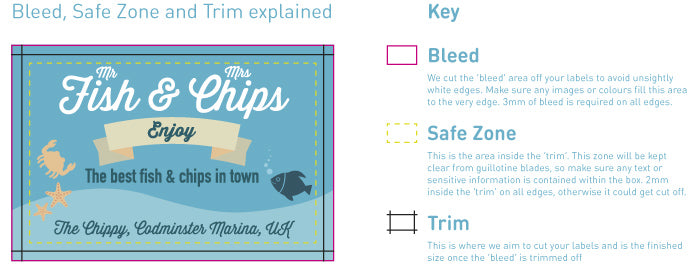
- Add 3mm bleed. Extend background colours, photos and patterns beyond the cut line so there are no unwanted white edges.
- Keep a 2mm safe area. Keep text, logos, borders and important details at least 2mm inside the cut line.
- Convert text to outlines. This stops fonts changing when we open the file for print.
- Check spelling and layout. We will check print suitability, but you are responsible for the wording and design supplied.
Bleed, Trim & Safe Area
Trim is the final cut line. Bleed is the extra artwork that extends past the trim line. Safe area is the space inside the trim line where important content should sit.
Even with accurate print and cutting equipment, every print job has a small tolerance. Bleed and safe area protect your design from looking uneven after cutting.
Use 3mm bleed
Background colours and images should continue 3mm beyond the cut edge.
Use a 2mm safe area
Text, borders and key details should sit at least 2mm inside the final cut edge.
File Types We Prefer
- Best formats: PDF, AI, EPS or PSD.
- Also accepted: high-quality JPG, JPEG or PNG files where vector artwork is not available.
- Resolution: image-based artwork should ideally be 300dpi at the final print size.
If you upload a file we cannot open or use, we will contact you before printing to talk through the options.
Colours & Colour Matching
CMYK colour values are preferred because this is the colour mode used for print. We can also use HEX, RGB, HSB or Pantone references as a guide.
Please remember that screen colours, Pantone colours and printed CMYK colours are not always identical. Some colours cannot be matched exactly in CMYK, and the material being printed can also affect the final result.
Fonts, Text & Borders
For the safest result, convert all text to outlines or curves before uploading. If you need us to edit text, include the font name and send the font file only if you are licensed to share it.
Avoid placing thin borders close to the edge, especially on stickers and cut-to-shape items. Small cutting tolerances can make very tight borders look uneven.
If You Are Not Sure
Upload the best file you have and add a note with anything important. If we spot a clear print issue, we will contact you before production.
For artwork questions before ordering, email us at online@smashsigns.co.uk and include the product, size and finish you are looking at.
